Contract visibility means anyone with the right permissions can answer, in seconds, where a contract is, who holds it and what happens next. CAMARC centralizes status, approvals, deadlines and performance metrics into role-based views, so leadership sees portfolio-level exposure while a property manager sees only the agreements they own.
The team behind CAMARC — trusted by enterprises including:










Ask a contract team how many agreements are in flight right now and how many renew in the next ninety days. In most organizations, answering takes days: someone opens a spreadsheet that was accurate last quarter, cross-references a shared drive, and emails three people to confirm.
The cost is not the time spent answering. It is the decisions made without the answer. Renewals auto-renew because nobody saw them coming. Vendors are re-tendered on gut feel because the actual spend is unknown. Leadership finds out about a bottleneck when a deal is already late.
Visibility is not a dashboard for its own sake. It is the difference between managing contracts and reacting to them.
Six ways to see what is actually happening across your agreements.
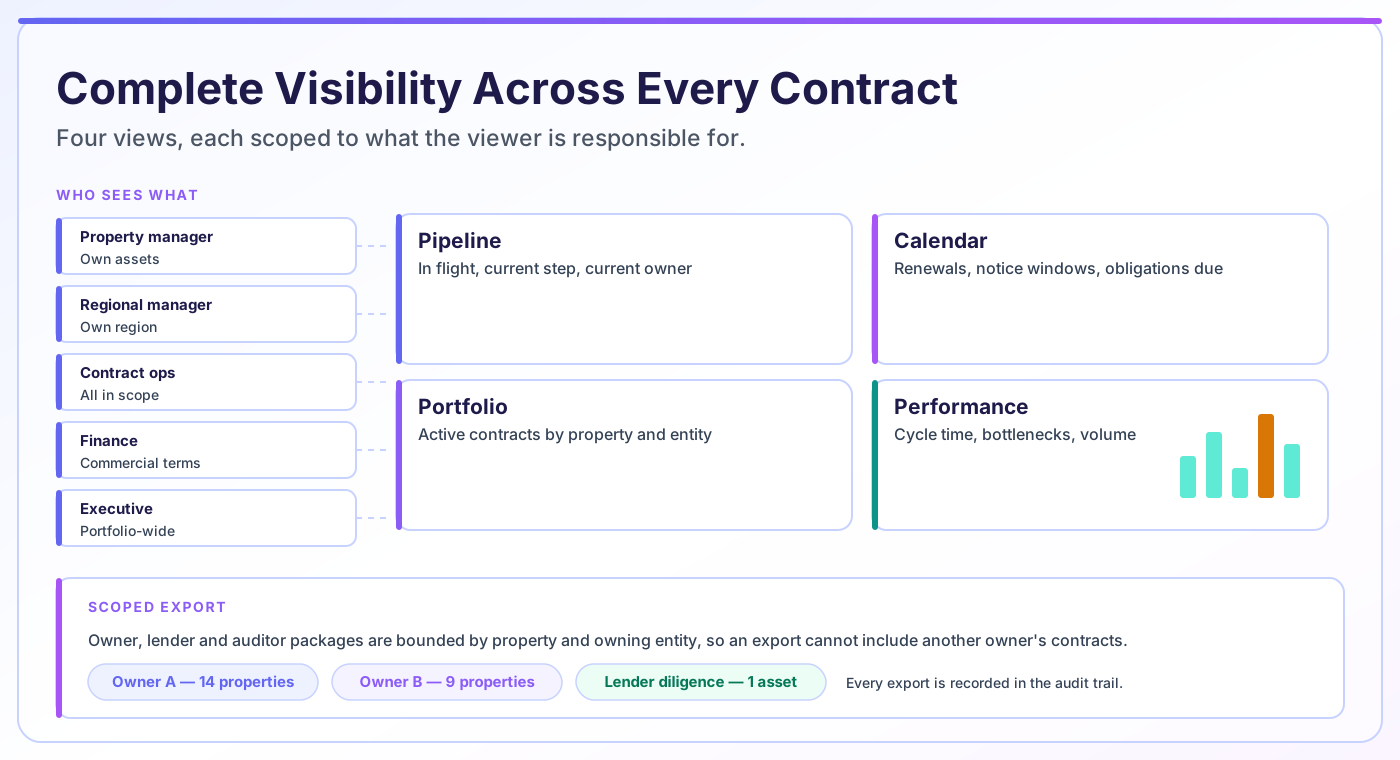
Every in-flight request and approval, with the current step, current owner, a live count and share of the total pipeline at each stage, and one click through to a pre-filtered list. Answers "where is it?" without anyone having to ask.
Every active contract organized by property, owning entity and contract type, in a fast, column-selective list built for scanning the whole portfolio at once — the structural view a folder hierarchy cannot give you, and the quick alternative to opening one contract's full history at a time.
Renewals, notice windows, option deadlines and obligations laid out on a timeline, so the next ninety days are visible rather than inferred.
Cycle time by contract type, where approvals actually stall, and volume broken down by team, by period, by contract type and by region or market — the operational picture that turns anecdote into evidence. Each widget loads independently with its own skeleton state, so one slow chart never holds up the rest of the dashboard.
Find agreements by counterparty, property, entity, contract type, value or date range, across both structured fields and document text.
Produce the reporting packages owners, lenders and auditors ask for, scoped so each recipient sees only what they are entitled to.
Different questions need different shapes of answer. These are the four that cover almost all of them.
What is in flight, at which step, and who is holding it. Used daily by contract operations and by anyone waiting on something.
What is active, by property and owning entity. Used when the question is about exposure, coverage or a specific asset.
What is coming due — renewals, notice windows, obligations. Used to plan the quarter rather than react to it.
How long things take and where they stall. Used to argue for process changes with numbers rather than impressions.
Reporting is scoped by the same permissions as everything else, so each role gets a view sized to what they are responsible for.
| Role | The question they ask | Primary view | What they watch |
|---|---|---|---|
| Leasing manager | Where is my amendment? | Pipeline | Current step, days in stage |
| Property manager | What is live at my property? | Portfolio (own assets) | Active agreements, COI status |
| Asset / regional manager | What renews across my region? | Calendar | Renewals, notice windows, options |
| Contract operations | What is stuck? | Pipeline + Performance | Bottlenecks, overdue steps |
| Finance | What are we committed to? | Portfolio + Performance | Value by entity, payment terms |
| Executive | Are we getting faster? | Performance | Cycle time, volume, exceptions |
| Owner / lender (via export) | What contracts affect my asset? | Scoped export | Their assets only |
Every view is bounded by the viewer’s permissions — a report cannot reveal contracts the person could not otherwise open.
Visibility is the capability with the widest internal audience.
Runs the pipeline view daily and stops spending mornings answering status questions by email.
See their own assets without wading through a portfolio-wide list, and catch expiring certificates before they lapse.
Plan around the renewal calendar rather than discovering options after they have expired.
Totals commitment by entity and property from structured data instead of assembling it from documents.
Track whether contracting is actually getting faster, with cycle-time and bottleneck data rather than impressions.
Receive scoped reporting packages covering their assets, produced as an export rather than as a manual compilation.
Contract visibility is the ability to answer questions about your agreements without opening them. Where is this contract? What renews next quarter? How much are we committed to with this vendor? Which properties have a lapsed certificate of insurance?
It depends on two things. First, contracts must be in one place — a repository rather than a set of folders. Second, the things you want to ask about must exist as structured data rather than as sentences inside a document. A contract platform that stores PDFs gives you retrieval, not visibility.
The practical test: if answering a routine portfolio question requires opening more than one contract, you have storage rather than visibility.
A dashboard is a presentation layer — a set of charts and counters showing selected metrics. Visibility is the underlying capability: complete, current, permission-scoped access to contract status and data, of which a dashboard is one possible view.
The distinction matters because dashboards are easy to demo and easy to get wrong. A dashboard built on incomplete data looks authoritative while being misleading, which is worse than no dashboard at all. If a third of your agreements were never entered into the system, the chart is confidently wrong.
If what you want is guidance on which metrics belong on a contract dashboard and how to design one per role, we covered that separately in our article on contract management dashboards. This page is about the capability underneath: making sure the data is complete, current and correctly scoped in the first place.
Build the repository and the structured data first. Charts drawn over partial data are the most confident way to be wrong.
Third-party managers and portfolio owners face a recurring reporting burden that generic contract tools handle badly: producing a package covering one owner’s assets, containing that owner’s contracts and nothing else.
Assembled manually, this is slow and carries a real disclosure risk — the failure mode is including a contract belonging to a different owner. Because CAMARC scopes reporting by property and owning entity, the export is bounded structurally rather than by whoever assembled it remembering to filter.
The same mechanism serves lender diligence and audit requests. The scope is defined by the structure, the export is recorded, and the package can be reproduced later.
The Monday portfolio review. Before, this meant a contract analyst spending Friday assembling a status spreadsheet from emails and a shared drive, which was already out of date by the time it was presented.
With portfolio-wide visibility, the same review runs off live views. The pipeline shows nine agreements in flight and which two have been sitting with the same approver for over a week. The calendar shows four renewals inside their notice window this quarter, one of which auto-renews in eighteen days. The portfolio view shows three properties with a vendor certificate expiring this month.
The meeting changes character. It stops being a status-gathering exercise and becomes a decision-making one, because the status was already visible to everyone before they walked in.
Reporting demos well and disappoints often. These are the questions that predict whether it will hold up in use.
Visibility is bounded by data completeness. Contracts created outside the process are invisible to it, and a view that silently excludes them is more dangerous than an obviously empty one. Getting the back catalogue in, and closing the paths that let people contract outside the system, matters more than any reporting feature.
Reporting quality also depends on the structured data captured at intake. If key dates were never entered as fields, no calendar view can surface them.
CAMARC reports on the contract data it holds. It does not interpret legal terms or assess whether a commercial position is good — those judgments remain with your team and your counsel.
Visibility is the output. These are the capabilities that produce and protect what it shows.
Contract visibility is the ability to answer questions about your agreements without opening them — where a contract is, what renews next quarter, how much is committed with a given vendor. It requires contracts to be in one repository and the things you want to ask about to exist as structured data rather than as text inside documents.
A dashboard is a presentation layer showing selected metrics. Visibility is the underlying capability: complete, current, permission-scoped access to contract status and data. A dashboard built on incomplete data looks authoritative while being misleading, so the capability matters more than the charts drawn over it.
Yes. Reporting is scoped by the same permissions as the contracts themselves, so a property manager sees their own assets, a regional manager sees their region, and an executive sees the portfolio. A report cannot surface a contract the viewer would not be able to open directly.
Views read from the live contract records, so a status change or an approval is reflected immediately rather than at the next refresh. This is what makes the pipeline view usable for daily standups rather than only for periodic reporting.
Yes. Exports are scoped by property and owning entity, which means an owner-level reporting package is bounded structurally rather than by whoever assembled it remembering to filter. Exports are recorded in the audit trail and the package can be reproduced later.
Reporting tells you the current state — what is active, what is in flight, what is due. Analytics looks for patterns across that data — which contract types take longest, where approvals consistently stall, how cycle time is trending. Reporting answers what is happening; analytics answers why and whether it is changing.
Which metrics belong on a contract dashboard, how to design one per role, and how to measure whether it pays off.
The operational metrics worth measuring, why each one matters, and the traps in measuring them badly.
An overview of the tooling landscape for analysing contract data, and what each category is actually good at.
Tell us the three contract questions your team currently cannot answer quickly. We will show you the views that answer them, scoped to your portfolio structure.