Contract automation software replaces email-based approvals with defined routes. In CAMARC, stakeholders submit one request form; the platform selects the right template and approval chain based on contract type, value, property and entity, then notifies each approver in turn. Nothing waits in an inbox, and every step is timestamped.
The team behind CAMARC — trusted by enterprises including:










Most contract delays are not caused by hard negotiation. They are caused by not knowing whose turn it is. A request arrives as an email with an attachment, someone forwards it to legal, legal asks a question the requester cannot answer, and the thread goes quiet for a week while everyone assumes someone else is handling it.
The cost is rarely visible on any single agreement. It shows up as an aggregate: vendors starting work before paperwork is signed, renewal windows closing while an amendment sits unreviewed, and a contract team that spends more time chasing status than reviewing terms.
Automation fixes this by removing the ambiguity rather than removing the people. The approvers stay the same. What changes is that the route is defined in advance, the handoff is automatic, and the current owner of every in-flight contract is always visible.
Six capabilities that turn an ad hoc approval chain into a repeatable, auditable process.
A single request form captures contract type, counterparty, value, property, owning entity, dates and attachments up front, so reviewers never open a request that is missing what they need.
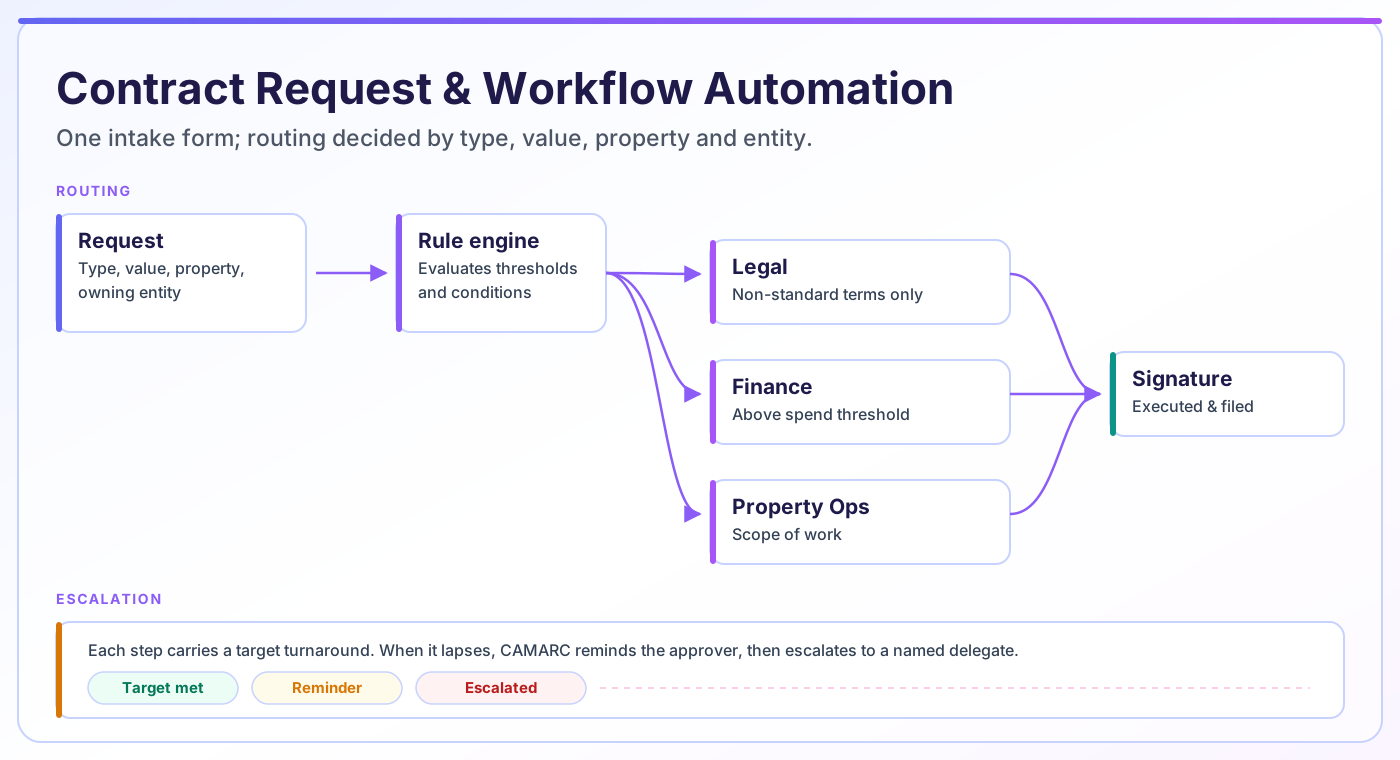
Rules decide the path. A standard service agreement under threshold can skip legal entirely; anything with non-standard indemnity or above a dollar limit routes to senior review automatically.
Each contract type is tied to a counsel-approved template. The document is generated in-platform — not in a separate word processor — and the output attaches directly to the contract record and the next workflow step, with no export or re-upload round-trip.
Each step carries a target turnaround. When it lapses, CAMARC reminds the approver, then escalates to a named delegate so a single absence does not hold up execution.
Reviews that do not depend on each other run at the same time. Finance and property operations can review in parallel while legal works, instead of queueing behind one another.
Requesters see exactly which step their contract is on and who holds it, which removes the status-chasing emails that consume most of a contract team’s week.
The same six steps run for every contract type, which is what makes the process auditable.
The requester completes a form scoped to the contract type they picked. Required fields are enforced at submission, not discovered later.
CAMARC evaluates contract type, value, property and owning entity against your rules and builds the approval chain for that specific request.
Each approver receives the contract with the context they need. Independent reviews run concurrently; dependent ones wait their turn.
Edits and comments happen on the document itself. Material changes can re-trigger an earlier approval so nobody signs off on language they never saw.
On final approval the contract moves to signature, routed to the correct signatories in the correct order.
The executed copy lands on the contract record, and the obligations and key dates captured at intake begin tracking automatically.
Automation should remove coordination work, not judgment. This is the line CAMARC draws by default, and it is configurable.
| Step | Automated by CAMARC | Still a human decision |
|---|---|---|
| Intake | Form validation, required fields, template selection | Whether the contract is commercially worth doing |
| Routing | Who reviews, in what order, based on type and value | Setting the thresholds and approval policy in the first place |
| Drafting | Populating template fields from the counterparty record | Any non-standard language or bespoke clause |
| Review | Assignment, reminders, escalation, version capture | Whether the terms are acceptable |
| Risk | Flagging deviations from the approved template | Judging whether a flagged deviation is tolerable |
| Approval | Enforcing that required approvers actually approved | The approval itself |
| Execution | Signer order, reminders, filing the executed copy | Who is authorized to sign for the entity |
CAMARC supports contract operations. It does not provide legal advice, and it does not replace review by qualified counsel.
Workflow automation touches everyone who currently appears in an approval email thread.
Stops being a routing switchboard. The rules do the dispatching, so the team can focus on template quality and exception handling.
Sees fewer contracts, and the ones that arrive are genuinely non-standard. Low-risk agreements clear on the approved template without a review cycle.
Submit a vendor or service agreement request without needing to know who approves what. The form asks for what is needed and the route resolves itself.
Gets contracts with value, payment terms and escalation clauses already structured, and is inserted into the chain automatically above the spend threshold.
Approve within their own scope only, and can see every in-flight request across the properties they are responsible for.
Get cycle-time and bottleneck reporting rather than anecdotes about which contracts are slow.
Contract workflow automation is the practice of encoding your contract review and approval process as rules a system executes, rather than as conventions people remember. The system decides who receives a contract, in what order, under what conditions, and what happens when a step runs late.
It is distinct from document automation, which generates the contract text, and from e-signature, which captures the signature. Workflow automation governs the movement between those points: intake to draft, draft to review, review to approval, approval to signature.
The practical test of whether a workflow is automated is simple. If a contract can sit still because nobody realised it was their turn, it is not automated — it is just stored somewhere new.
Start narrow. Teams that try to model every contract type at once usually stall, because the edge cases are where all the disagreement lives. Pick the two or three highest-volume contract types, get those routing cleanly, then expand.
Resist the urge to add an approver "just to be safe". Every additional required approval adds latency to every contract of that type, forever.
Consider a landscaping contract renewal across a 40-property portfolio held in twelve owner entities. Approval authority here is not departmental — it is scoped to property and entity. The site property manager confirms the scope of work, the regional director approves above a threshold, and the authorized signatory of the specific LLC that owns that asset signs.
Routed manually, this means someone has to know which entity owns which property, who the current signatory is for that entity, and what the delegated spending limit is this year. That knowledge tends to live with one or two long-serving people.
In CAMARC the property and owning entity are captured at intake, so the route resolves automatically: correct site manager, correct regional approver if the value clears the threshold, correct entity signatory. The same request submitted for a different property produces a different, equally correct chain.
Most platforms can route a document. The differences show up in the awkward cases, so it is worth testing against these when you evaluate anything — including CAMARC.
Automation will not improve a process nobody agrees on. If two departments genuinely disagree about who should approve what, encoding that disagreement in software makes it fire faster, not disappear. Settle the policy first.
It also does not remove the need for legal review — it concentrates it. The intended outcome is that counsel spends their time on the genuinely non-standard agreements rather than on routine renewals that match an approved template.
CAMARC supports contract operations and workflow automation. It does not provide legal advice, and it is not a substitute for review by qualified legal counsel.
Request and approval automation is the front half of the lifecycle. These capabilities pick up where it hands off.
Contract workflow automation encodes your review and approval process as rules a system executes: who receives a contract, in what order, under what conditions, and what happens when a step runs late. It governs movement between intake, drafting, review, approval and signature, rather than generating the document or capturing the signature.
At intake, CAMARC captures contract type, value, property and owning entity. It evaluates those against your configured rules and builds the approval chain for that specific request — including which approvers are required, which can review in parallel, and which are only pulled in above a threshold.
Yes. Rules can combine conditions, so a standard service agreement below a threshold may need only the property manager, while the same agreement above that value, or with non-standard terms, additionally routes to finance and senior legal review.
No. It means legal reviews fewer routine agreements and more of the ones that actually deviate from approved language. Contracts that match a counsel-approved template and sit inside agreed thresholds clear without a full review cycle; anything outside those bounds still routes to counsel.
Each step carries a target turnaround. When it lapses, CAMARC sends a reminder and then escalates to a named delegate, so a single absence or unread notification does not hold a contract indefinitely.
Contract management software is the broader category: storage, data, visibility, compliance and reporting across the contract lifecycle. Contract automation software refers to the workflow layer within it — the routing, approvals and handoffs that move a contract from request to execution.
No. Generation happens inside CAMARC from the approved template for that contract type. The output attaches to the contract record automatically and moves straight into the next workflow step, so there is no export, no re-upload, and no question about which file is the real one.
The stages of a contract workflow, where handoffs typically break, and how to map your current process before automating it.
A deeper look at automated contracting for enterprises, including what to automate first and how to sequence a rollout.
A step-by-step walkthrough of the end-to-end contract management process from request through renewal.
We will walk through one of your real contract types — intake fields, routing rules, thresholds and escalation — and show what it looks like running in CAMARC.