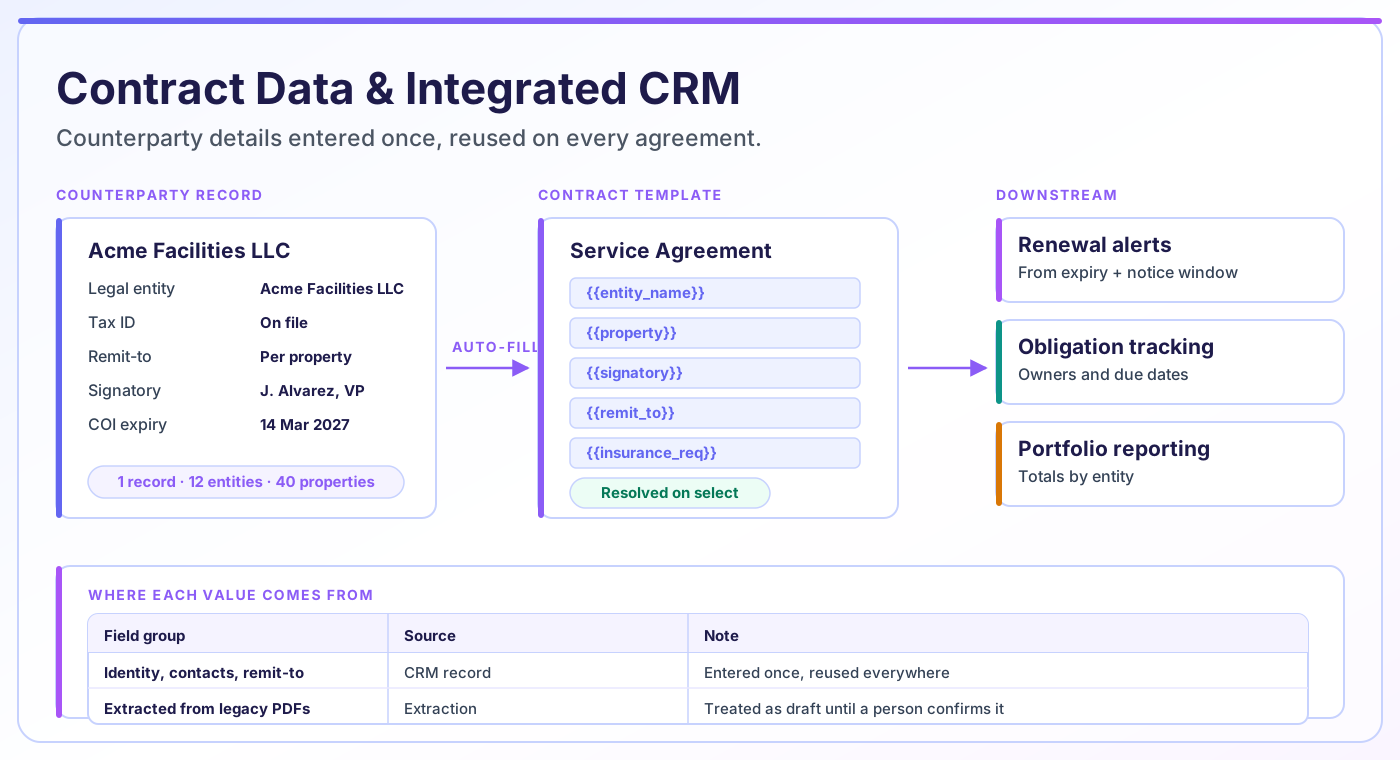
CAMARC’s built-in CRM stores vendor, tenant and counterparty records — contacts, entity names, insurance certificates and attachments — and uses them to populate new contracts automatically. Instead of retyping the same details into every agreement, teams select the counterparty once and the platform fills the template, keeping contract data consistent and searchable.
The team behind CAMARC — trusted by enterprises including:










Almost every downstream contract capability depends on the data captured when the contract was created. Renewal alerts need an accurate end date. Compliance tracking needs the right obligation owner. Portfolio reporting needs the correct owning entity. If any of those were typed by hand into a Word template, the failure rate is exactly the typo rate.
The failure is quiet. Nobody notices a wrong renewal date until the renewal is missed. Nobody notices that the same vendor exists under three slightly different names until someone tries to total the spend and gets three answers.
Fixing this is unglamorous but high-leverage: capture counterparty details once, as structured data, and let every contract draw from that record rather than from someone’s memory.
A counterparty record that does real work, rather than a contacts list nobody maintains.
Vendors, tenants and other counterparties are records, not free text — legal entity name, contacts, addresses, tax and remit-to details, all in one place.
Selecting a counterparty populates the contract template’s merge fields. Details are entered once and reused, so the same name appears the same way on every agreement.
Insurance certificates, W-9s, licences and compliance documents attach to the counterparty rather than to a single contract, with their own expiry dates.
Value, term, key dates, renewal type and notice period are captured as fields rather than buried in prose, which is what makes them trackable and reportable.
Approved language is stored once and reused, so drafting starts from counsel-reviewed clauses rather than from whichever version was nearest to hand.
Update a counterparty’s entity name or remit-to address once and future contracts use the corrected value, instead of the error persisting document by document.
Five steps that replace retyping with selection.
A vendor or tenant is added as a record with its legal entity name, contacts, addresses and supporting documents.
Whoever raises a contract request picks the existing counterparty rather than typing its details again.
Merge fields in the approved template resolve from the counterparty record and the request, producing a draft that is already accurate.
Value, term, key dates and renewal terms are entered as structured fields on the contract, not just written into the text.
Those fields drive renewal alerts, obligation tracking and reporting, so the data entered at intake keeps working for the life of the agreement.
Knowing the source of a value tells you how much to trust it, and who to chase when it is wrong.
| Field group | Examples | Source |
|---|---|---|
| Counterparty identity | Legal entity name, DBA, tax ID, registered address | CRM record — entered once, reused |
| Contacts | Signatory, billing contact, operational contact | CRM record |
| Commercial terms | Contract value, payment terms, escalation, rate schedule | Entered on the request, validated at review |
| Key dates | Effective date, expiry, renewal window, notice deadline | Entered on the request; drives all downstream alerts |
| Portfolio scope | Property, owning entity, cost centre | Selected at intake — this is what scopes permissions and reporting |
| Standard language | Approved clauses, fallback positions | Clause and template library |
| Supporting documents | Certificates of insurance, W-9, licences | Attached to the counterparty record with their own expiry |
| Negotiated language | Anything deviating from the template | Human — drafted and reviewed, never auto-generated |
Any value read out of an existing document rather than entered directly should be treated as a draft until a person confirms it.
Mostly invisible when it works, and painfully visible when it does not.
Stops re-keying counterparty details and stops reconciling three spellings of the same vendor into one report.
Gets spend that totals correctly per vendor and per entity, because the counterparty is one record rather than several near-duplicates.
Raise a request by selecting a known vendor instead of retyping details they may not have to hand.
Sees drafts that start from approved clause language, so review focuses on genuine deviations rather than on formatting and names.
Tracks certificate and licence expiry on the counterparty record, where it belongs, rather than per contract.
Can filter and total by entity, property, contract type or date because those are fields, not sentences.
Contract data extraction is the process of reading an existing agreement and pulling structured values out of it — parties, dates, value, renewal terms — so a contract that arrived as a PDF can be tracked like one created in the system.
It is genuinely useful for onboarding a back catalogue, and it is genuinely imperfect. Accuracy depends heavily on document quality and on how conventionally the contract is written. A clean, standard-form agreement extracts well. A scanned amendment with handwritten margin notes does not.
The right posture is to treat extracted values as a draft that a person confirms, particularly for the fields that drive alerts. A wrong renewal date that nobody validated is worse than no renewal date at all, because it produces false confidence. We wrote about this in more detail in our piece on contract data accuracy.
CAMARC structures contract data. It does not interpret legal meaning, and extracted values should be validated before they are relied on.
Not everything needs to be a field. The test is simple: if you would ever want to search on it, report on it, or be alerted about it, it needs to be structured. If you would only ever read it, it can stay in the document.
One elevator maintenance vendor services forty properties held across twelve owner entities. Each property has its own service agreement, its own certificate of insurance naming that specific entity as additional insured, and its own remit-to arrangement.
Modelled as free text on forty contracts, this is unmanageable. The vendor appears under several name variants, nobody can total the relationship spend, and certificate expiry is tracked in a spreadsheet that is accurate for about a week after someone updates it.
Modelled properly, there is one vendor master record with many counterparty entity relationships beneath it. Each agreement links to the vendor, the property and the owning entity. Certificates hang off the relationship with their own expiry dates. Total spend, expiring certificates and affected properties are all queries rather than projects.
This many-to-many shape — one vendor, many entities, many properties — is specific to how real estate is owned and operated, and it is the thing generic CRM data models handle badly.
Data modelling is the least demoed and most consequential part of any contract platform. Ask about these specifically.
Structured data is only as good as the discipline behind it. If people can bypass intake and create contracts outside the process, the record will be incomplete no matter how good the model is. That is a governance problem, not a software one.
Extraction from legacy documents needs human validation, especially for dates and values that will drive alerts. Plan for that review time rather than assuming a clean import.
CAMARC structures and organizes contract data. It does not interpret legal terms, assess their meaning, or provide legal advice, and it is not a substitute for qualified legal counsel.
Contract data is what everything else runs on. These are the capabilities that consume it.
Contract data extraction reads an existing agreement and pulls structured values out of it — parties, dates, contract value, renewal terms — so a contract that arrived as a document can be tracked as a record. It is most useful for onboarding a back catalogue, and extracted values should be validated by a person before they are relied on for alerts.
It does not have to. CAMARC’s CRM exists to hold the counterparty data that contracts need — entity names, contacts, remit-to details, certificates. Where a sales or property CRM already exists, CAMARC complements it by owning the contract-side record rather than duplicating the commercial relationship.
Because there is one authoritative record per counterparty, an error is corrected in one place rather than on every contract that inherited it. Corrections apply to future contracts, and the audit trail records what changed and when, so you can identify which existing agreements were created from the earlier value.
Anything you would want to search, report on or be alerted about: counterparty, owning entity, property, effective and expiry dates, renewal type and notice window, contract value and payment terms, and obligation owners with due dates. Language you would only ever read can stay in the document.
Yes. Supporting documents attach to the counterparty rather than to a single contract, and carry their own expiry dates. That is what allows a lapsing certificate to be flagged once, against every property and agreement it affects, instead of being tracked separately per contract.
Dates and terms captured as structured fields at intake become the inputs to obligation tracking and reporting. A renewal alert fires from the expiry date and notice window; a portfolio report totals by owning entity and property. Neither is possible if those values only exist as sentences inside the document.
Where automated extraction succeeds, where it fails, and how to build a validation step that catches the difference.
What structured contract data makes possible once it exists, from spend analysis to risk concentration.
A grounded look at where AI genuinely helps in contract management, and where it is still oversold.
Show us how your counterparty data is structured today. We will model one vendor relationship across multiple properties and entities so you can see the difference it makes downstream.