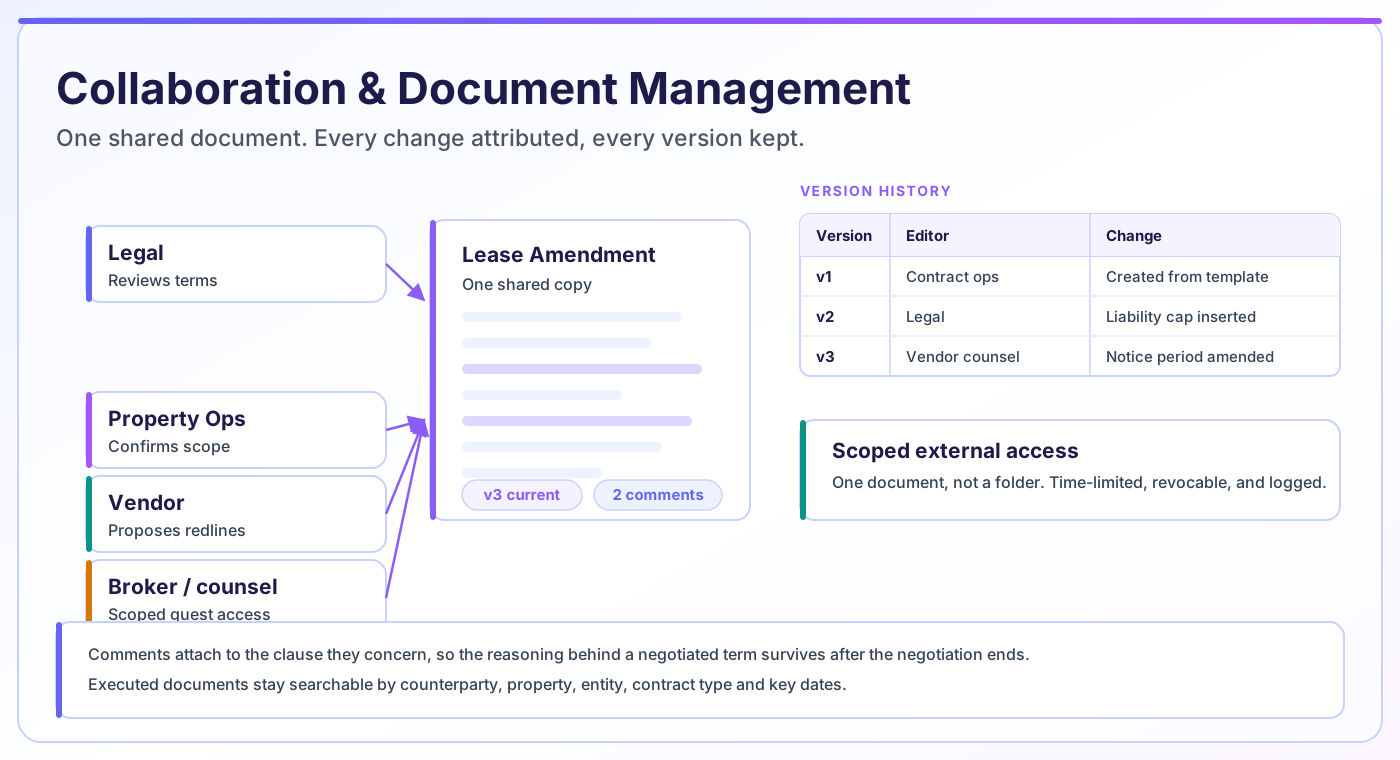
Contract collaboration software lets everyone work on one copy of a contract instead of emailing attachments. In CAMARC, internal teams and external vendors review, edit and comment in the same document, and version history records every change, who made it and when — so there is never a question about which draft is current.
The team behind CAMARC — trusted by enterprises including:








Contract negotiation over email attachments produces a predictable failure. Two people edit the same draft in parallel, both send it back, and someone has to manually reconcile two sets of changes. Occasionally they miss one, and a term nobody agreed to survives into the executed agreement.
The deeper cost is that the negotiation history evaporates. Six months later, when someone asks why the liability cap was set where it was, the answer is buried in a thread that only two people were on, one of whom has left.
Working on a single shared copy removes both problems at once. There is one document, changes are attributed as they happen, and the reasoning lives alongside the text as comments rather than in somebody’s inbox.
Everything needed to negotiate a contract without a single attachment leaving the platform.
Edits happen on the contract itself, with changes marked and attributed. Reviewers see what was proposed and by whom without opening a comparison tool.
Questions and rationale attach to the clause they concern and stay with the contract record, so the reasoning behind a term survives after the negotiation ends.
Every saved version is retained with its author and timestamp. Compare any two versions, see exactly what moved, and restore an earlier one if a negotiation goes backwards.
Reviewers are assigned rather than cc’d. Each one sees what is waiting on them, and the contract shows who still has it open.
Vendors, brokers and opposing counsel get access to the one document they are negotiating — not to a folder, not to your portfolio — and that access can be revoked.
Executed contracts stay where they were negotiated, searchable by counterparty, property, entity, contract type and key dates rather than by remembering a filename.
From first draft to filed executed copy without an attachment ever being emailed.
The contract is created from an approved template inside CAMARC, so there is one authoritative copy from the very beginning.
Internal reviewers and external parties are granted access to that document, scoped to what they need and revocable at any point.
Edits, redlines and comments land on the shared document. Everyone always sees the current state; nobody is working from a stale attachment.
Each round is captured with author and timestamp, so you can compare versions, see what changed and restore if needed.
The executed copy is stored on the contract record alongside its full negotiation history, and stays searchable for the life of the agreement.
Most teams have already tried the first two. This is where each approach actually breaks down.
| Capability | Email attachments | Shared drive | CAMARC |
|---|---|---|---|
| Single source of truth | No — one copy per recipient | Partly — until someone downloads it | Yes — one document, always current |
| Who changed what | Only if tracked changes survive | File-level history at best | Per-change, attributed and timestamped |
| External party access | Send the whole file, forever | Usually a link with broad scope | Scoped to one document, revocable |
| Redline history | Scattered across a thread | Not retained | Retained per version |
| Negotiation rationale | In someone’s inbox | Not captured | Comments attached to the clause |
| Retrieval after two years | Search your inbox and hope | Depends on the folder convention | Search by counterparty, property or date |
| Revoking access | Not possible | Possible, often forgotten | One action, logged |
Collaboration tooling speeds up review. It does not replace legal review, and it does not constitute legal advice.
Anyone who currently appears on a contract email thread.
Review in place, leave rationale on the clause, and never reconcile two conflicting drafts by hand again.
See the current state of a vendor agreement without asking, and comment on scope-of-work language directly.
Get access to the one document they are negotiating, without needing a licence to your system or a copy of anything else.
Collaborate as external parties with scoped, time-limited access that can be withdrawn once the deal closes.
Comment on payment terms and escalation clauses at the point they appear rather than in a separate review email.
Read the negotiation history alongside the executed document instead of asking people to reconstruct it from memory.
Redlining software makes proposed changes to contract language visible as changes — showing what was struck, what was inserted and who did it — rather than presenting a silently edited document. Without it, reviewing a returned draft means reading the entire agreement again to find what moved.
You need it as soon as contracts are negotiated with anyone outside your own team. For internal-only, template-driven agreements it matters less. For vendor MSAs, lease amendments and anything touched by opposing counsel, it is the difference between a five-minute review and an hour of comparison.
CAMARC keeps redlines attached to the version they belong to, so the record of what each party proposed survives past the negotiation rather than living in whichever comparison file someone generated.
Version control keeps every saved state of a document, labelled with who saved it and when, and lets you compare or restore any of them. In CAMARC each round of negotiation produces a version, and the differences between versions are inspectable.
This is a working tool, and it is worth distinguishing it from an audit trail, which serves a different purpose. Version control answers "what does this contract say now, and what did it say before?" — it is what you use during a negotiation.
An audit trail answers "what happened to this contract, and who did it?" — every field change, permission change, approval and export, in an append-only record built for evidence rather than for editing. The two overlap but are not interchangeable, and CAMARC keeps both.
If your question is "can I get the previous draft back?", that is version control. If it is "prove to an auditor that this was approved before it was signed", that is the audit trail.
The reason contracts get emailed is usually not preference — it is that the system has no good way to let an outsider in. So a file gets attached, and from that moment you have no control over where it goes or who else sees it.
CAMARC treats external collaborators as first-class but tightly scoped participants. A vendor is granted access to the specific agreement being negotiated. They can read it, comment, and propose changes. They cannot browse other contracts, see other properties, or discover which other vendors you work with.
Access is revocable and logged, so when a negotiation ends you can close it off, and there is a record of who had access and for how long.
A lease amendment is being negotiated with a tenant whose outside counsel is handling the redlines. On the landlord side, the leasing manager owns the commercial terms, the property manager needs to confirm the operational language, and internal legal has to approve any deviation from the standard form.
Handled by email, that is four parties producing at least six versions, with the leasing manager acting as a manual merge tool between them.
In CAMARC there is one document. Tenant counsel has scoped access and proposes changes as redlines. The property manager comments on the operational clause without touching the commercial terms. Legal sees exactly what deviates from the standard form. When it executes, the amendment and its entire negotiation history sit on the lease record for whoever inherits the file.
Worth testing against any platform you evaluate, this one included. Most tools do the first three well and fall down on the rest.
Collaboration tooling makes review faster and more traceable. It does not make the review itself unnecessary, and it will not tell you whether a proposed change is acceptable — that judgment stays with your reviewers and your counsel.
It also cannot help with contracts negotiated somewhere else. If a counterparty insists on their own system, you are back to importing an executed PDF, and you lose the negotiation history. That is a real constraint worth planning around rather than pretending away.
CAMARC supports contract operations. It does not provide legal advice and is not a substitute for review by qualified legal counsel.
Collaboration is where the document takes shape. These capabilities handle what happens before and after.
Contract collaboration software lets multiple parties work on one shared copy of a contract rather than exchanging attachments. It combines in-place editing, redlining, threaded comments and version history, so the current state of a negotiation and the record of how it got there are always available in one place.
Yes. External parties are invited to a specific contract as scoped collaborators. They can review, comment and propose changes on that document only — they cannot browse other contracts, properties or counterparties — and their access can be revoked once the negotiation is finished.
Yes. Proposed changes are shown as changes, attributed to whoever made them, and retained against the version they belong to. Reviewers see what moved rather than having to re-read the whole agreement to find it.
Version control is a working tool: it retains each saved draft so you can compare or restore them during a negotiation. An audit trail is an evidentiary record: an append-only log of every change, approval, permission change and export. Version control answers what the contract said; the audit trail answers what happened to it and who did it.
On the contract record in CAMARC, alongside the versions and comments from the negotiation. They stay searchable by counterparty, property, owning entity, contract type and key dates, so retrieval does not depend on remembering a filename or folder.
Document management is about the files: storage, versioning, editing and permissions. A contract repository adds structured contract data on top — counterparty, value, key dates, obligations — so agreements can be searched, reported on and monitored as records rather than only retrieved as documents.
How cross-functional collaboration changes contract outcomes, and the practices that make shared review actually work.
How document automation generates contracts from templates and structured data, and where it fits alongside collaboration.
What changes when reviewers, vendors and counsel are never in the same building, and how cloud CLM addresses it.
Bring a contract your team is currently negotiating by email. We will show you the same negotiation running on one document, with the history intact.