Common Pitfalls When Adopting CLM Software (and How to Avoid Them)
Educational note: This article is educational and strategic in nature. It should not be presented as legal advice.
Adopting contract lifecycle management software should make contracts easier to request, review, approve, sign, and track.
Yet many rollouts disappoint because teams focus on software features and ignore process discipline.
That gap is why a capable contract lifecycle management system can still fail to deliver business value after launch.
The real challenge is not only choosing the right platform. It is rolling it out in a way that people trust, use, and improve over time.
This CAMARC guide looks at the most common adoption mistakes and explains how to avoid them with practical rollout choices.
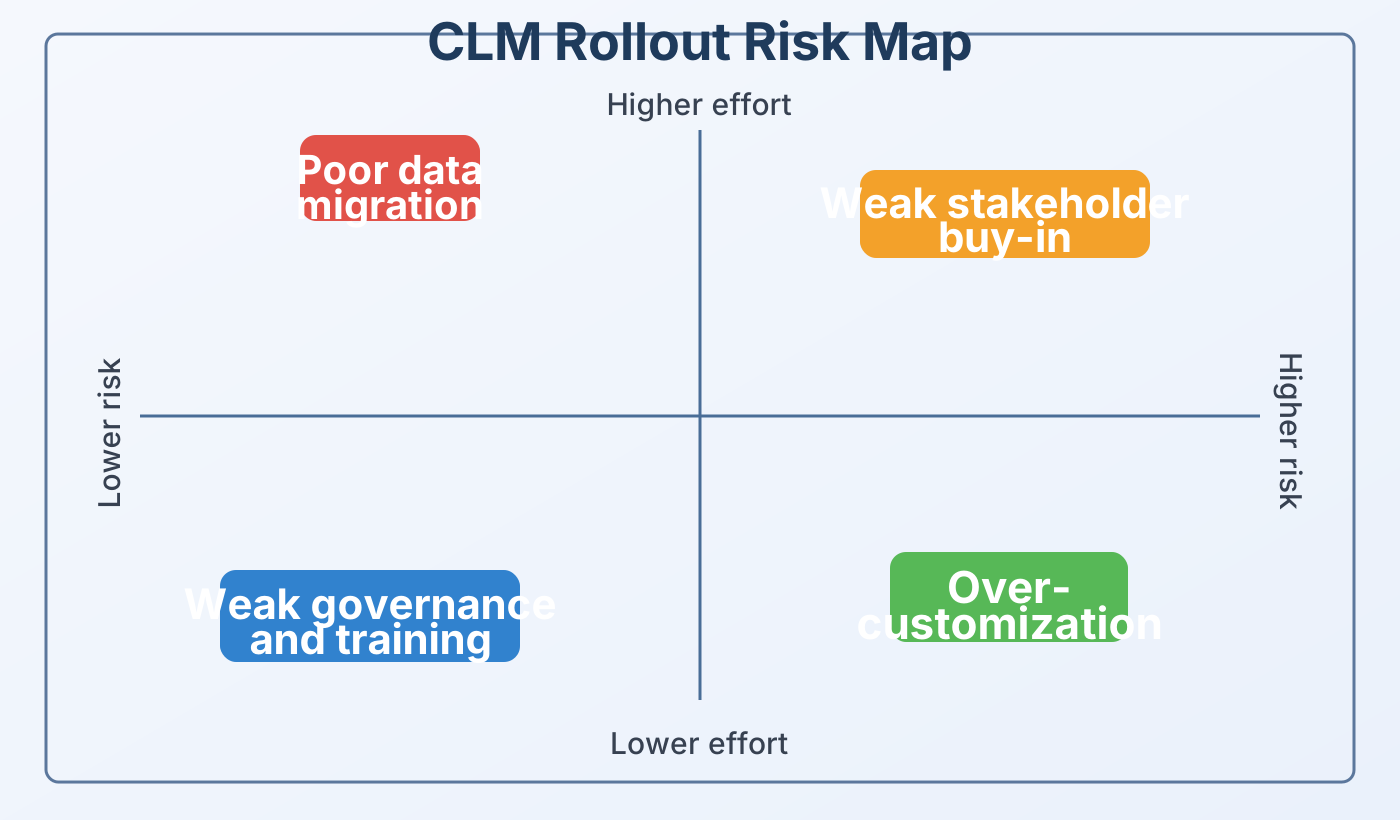
The highest-risk mistakes usually appear early and become expensive if they are ignored.
1. Poor data migration
Why it happens
Most companies do not start with one clean source of contract truth. They have files in shared drives, inboxes, old contract management systems, and local folders. Metadata is inconsistent, versions are unclear, and many records are missing renewal details. That makes migration look simple on paper but risky in practice.
What goes wrong
When weak records are loaded into a new contract document management system, the same problems return in a new interface. Search becomes unreliable and dashboards stop reflecting reality. Automated reminders can fire on the wrong date or miss a key milestone entirely. Once users stop trusting data, they start building side trackers outside the platform.
The hidden cost
Bad data damages more than reporting. It weakens obligation tracking, approval visibility, and audit readiness across the full contract management lifecycle. It also slows adoption because users feel the new system creates work instead of reducing it. That is why migration quality is often the first signal of long-term CLM success.
How to avoid it
Start with a source inventory before any migration begins. Separate executed contracts from drafts, rejected requests, expired files, and obsolete templates. Define mandatory fields such as contract type, owner, counterparty, effective date, expiration date, and renewal terms. Then map old statuses to the new contract management process and run a pilot migration before wider cutover. Test reports, alerts, search, and lifecycle views on that pilot set before you move the rest.
How CAMARC helps
CAMARC is built for lifecycle control, not simple storage. The platform supports contract uploads, search and filtering, dashboards, notifications, vendor data, and legacy migration support. That allows teams to create a cleaner landing zone for enterprise contract lifecycle management software adoption. Instead of a risky big-bang import, teams can move trusted records in controlled waves.
Quick checklist
- Create one migration inventory with source, owner, status, and metadata gaps.
- Archive duplicates before loading records into the new system.
- Map every legacy status to the new contract management lifecycle.
- Validate reports and alerts on a pilot set before full cutover.
- Assign owners for sensitive fields such as renewal dates and counterparties.
Reference: Microsoft Learn, plan your migration | CAMARC homepage
CTA 1: Audit before you import
Review your legacy contracts, naming rules, metadata, and renewal dates before migration. A short audit can prevent months of cleanup later.
Explore CAMARC features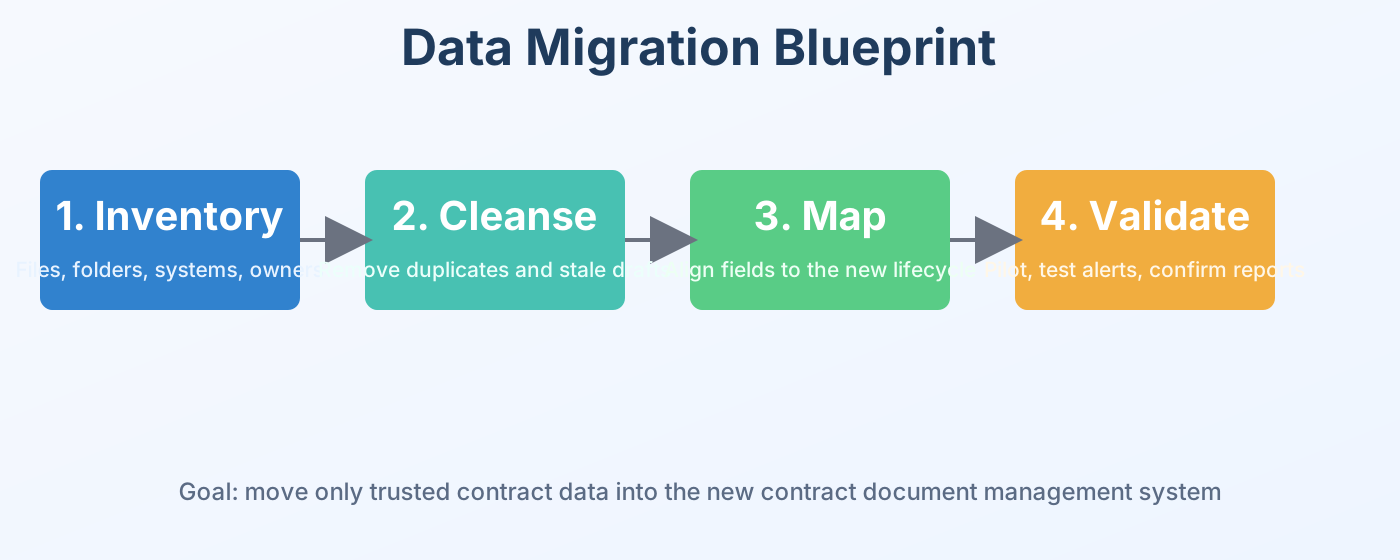
A clean migration plan protects trust in the new contract lifecycle management software from day one.
2. Weak stakeholder buy-in
Why it happens
Many CLM projects are sponsored by one team, often legal or procurement. But success depends on legal, finance, sales, operations, IT, and the people who submit requests every day. If even one of those groups feels ignored, the rollout loses momentum. A contract lifecycle management platform only works when all key roles see a reason to use it.
What goes wrong
Users keep sending contracts by email instead of using formal intake. Managers request spreadsheet updates because they do not trust the workflow view. Approvals happen in side conversations rather than in the system. Soon the new contract management applications become an extra step instead of the normal path.
Why resistance is normal
People rarely resist change without a reason. They worry that a new process will slow them down, ask for unfamiliar data, or remove shortcuts that used to help them hit deadlines. If leadership cannot explain the gain for each role, the old habits remain stronger than the new system. That is especially true for enterprise contract lifecycle management software where many teams touch the same process.
How to avoid it
Build a cross-functional rollout team from the start. Name an executive sponsor, a process owner, a system owner, and department champions. Show each role how the contract management software will save time, reduce risk, or improve visibility. Run role-based demos using real scenarios from legal, procurement, finance, and operations. Pilot with actual users and measure adoption by role, not only by total contract count.
How CAMARC helps
CAMARC is designed around structured request, review, approval, execution, and tracking workflows. That makes it easier to align business users, legal reviewers, risk teams, and finance around one contract lifecycle management system. When people can see their stage, owner, and deadline, the workflow becomes part of everyday work. That clarity improves adoption far more than feature lists alone.
Quick checklist
- Map every user role that touches the contract management process.
- Use role-based demos instead of one generic training session.
- Create champions in legal, procurement, finance, and operations.
- Publish success stories from the pilot group.
- Track adoption by team after launch.
Reference: Microsoft Learn, create a change management strategy | CAMARC About page
CTA 2: Build buy-in before go-live
If legal supports the rollout but requestors avoid the workflow, adoption will still fail. Align sponsors, champions, and end users before launch.
Learn how CAMARC fits real teams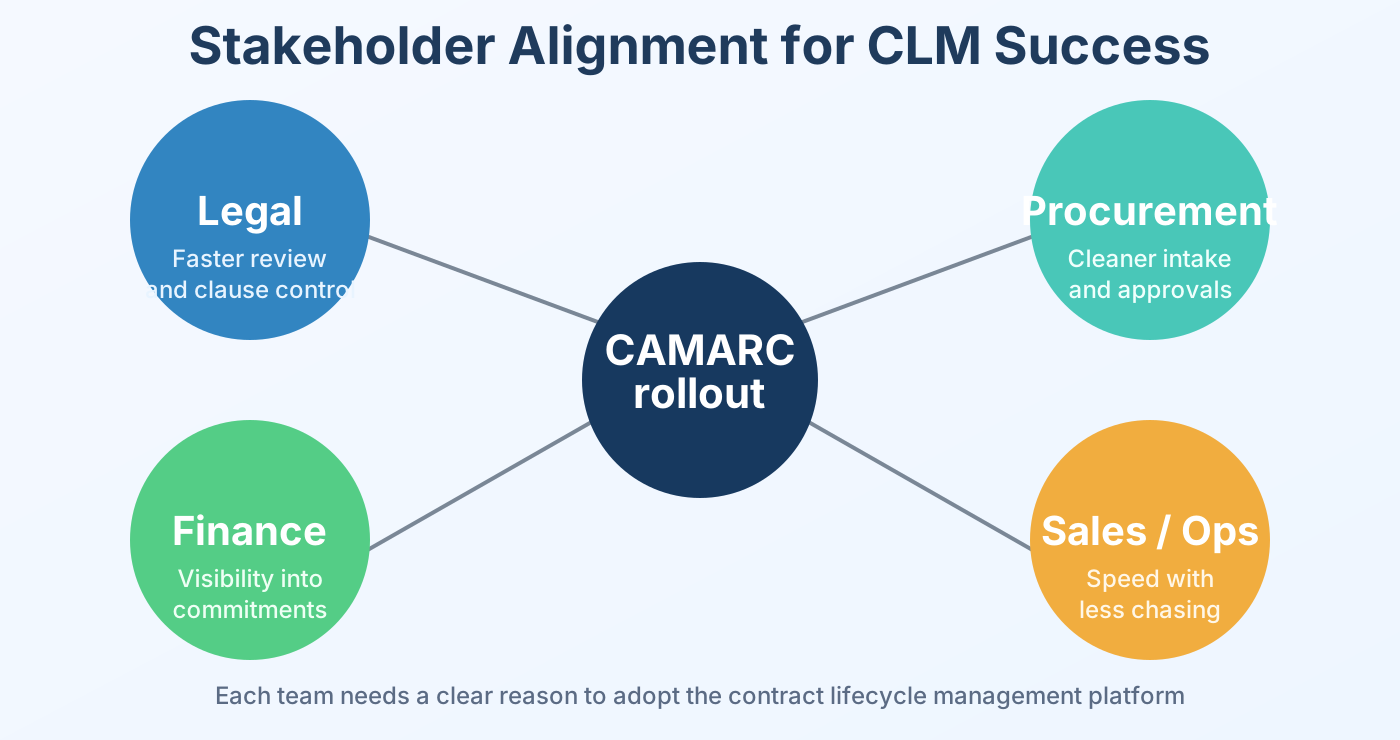
Buy-in improves when each function understands how the contract lifecycle management platform helps its daily work.
3. Over-customization
Why it happens
Every department wants the platform to reflect its exact habits. Extra fields are added, approval paths multiply, and old exceptions get copied into the new design. That sounds responsive, but it often creates a contract lifecycle management platform that is hard to test and harder to use. The first release becomes too complex before users even trust the basics.
What goes wrong
The interface becomes harder to learn and slower to navigate. Admins spend more time supporting edge cases than improving the core contract management process. Future upgrades become expensive because each change touches custom logic. Instead of simplifying work, the contract management software preserves yesterday's complexity.
Why this is a long-term problem
Over-customization also weakens reporting and analytics. When each team uses different fields and paths, it becomes harder to compare cycle time, identify bottlenecks, or trust dashboard trends. That limits the value of contract management tools, BI dashboards, and future automation. Standardization today is what makes smarter automation possible tomorrow.
How to avoid it
Define a minimum viable workflow for launch. Keep fields, template variants, and approval branches as limited as possible. Review each customization with three questions: does it reduce risk, save real time, or need to exist at launch? If the answer is no, move it to a later phase. A first release should prove value, not capture every historical exception.
How CAMARC helps
CAMARC delivers value through workflow automation, role-based access, dashboards, collaboration, and audit visibility. Those strengths support a clean operating model without turning every old habit into permanent system logic. That is a major advantage when teams compare contract lifecycle management solutions or enterprise contract lifecycle management software. A structured product is easier to scale than a heavily customized one.
Quick checklist
- Standardize templates before building custom document variants.
- Limit approval paths to the few that truly change authority or risk.
- Keep a governance log for every requested customization.
- Protect maintainability during the first release.
- Schedule phase-two enhancements only after adoption stabilizes.
Reference: NIST SP 800-53 security and privacy controls | CAMARC contract lifecycle management software page
CTA 3: Keep your first release simple
A simpler launch is easier to test, easier to train, and easier to trust. Start with the workflow that most contracts follow.
Read CAMARC guides4. Weak governance and training
Why it happens
Some teams treat go-live as the end of the project. They launch the system without clear ownership for templates, permissions, reporting, or release control. Training is delivered once and then forgotten. That leaves the contract management lifecycle exposed to drift within weeks of launch.
What goes wrong
Permissions drift, templates become inconsistent, and users create workarounds outside the system. Without audit discipline and role clarity, the new automated contract management system can create fresh risk. The platform may be live, but the contract management process is still unstable. Users then blame the software when the real problem is weak operating discipline.
Why governance matters
Governance is not only an IT concern. It protects data quality, template control, release management, approvals, reporting logic, and the integrity of the full contract management lifecycle. It also helps leadership answer simple questions about status, risk, and missed obligations with confidence. Without governance, the system cannot become a reliable source of truth.
How to avoid it
Publish a governance model before launch. Define owners for templates, metadata, user roles, dashboards, integrations, and release changes. Use role-based training for requestors, reviewers, approvers, and admins. Then track cycle time, incomplete records, off-system approvals, and missed obligations every month. Support users with office hours, refreshers, quick guides, and clear escalation paths after go-live.
How CAMARC helps
CAMARC supports governance with RBAC, dashboards, notifications, collaboration history, and stage-based lifecycle tracking. Your shared product materials also point to Microsoft Entra ID, Power BI dashboards, and structured review stages. Those controls help turn clm contract management into a monitored business process instead of an ungoverned document store. That matters for legal teams, finance teams, and leaders who need trustworthy reporting.
Quick checklist
- Set permissions by role, not by one-off access requests.
- Run monthly governance reviews after go-live.
- Train users on outcomes, not only on screens.
- Measure adoption and data quality together.
- Publish a clear support path for post-launch issues.
Reference: NIST audit trail guidance | NIST RBAC guidance | CAMARC homepage
CTA 4: Govern the platform after launch
Go-live is only the start. Set ownership, training, release control, and monthly reporting so the platform keeps improving.
See CAMARC in action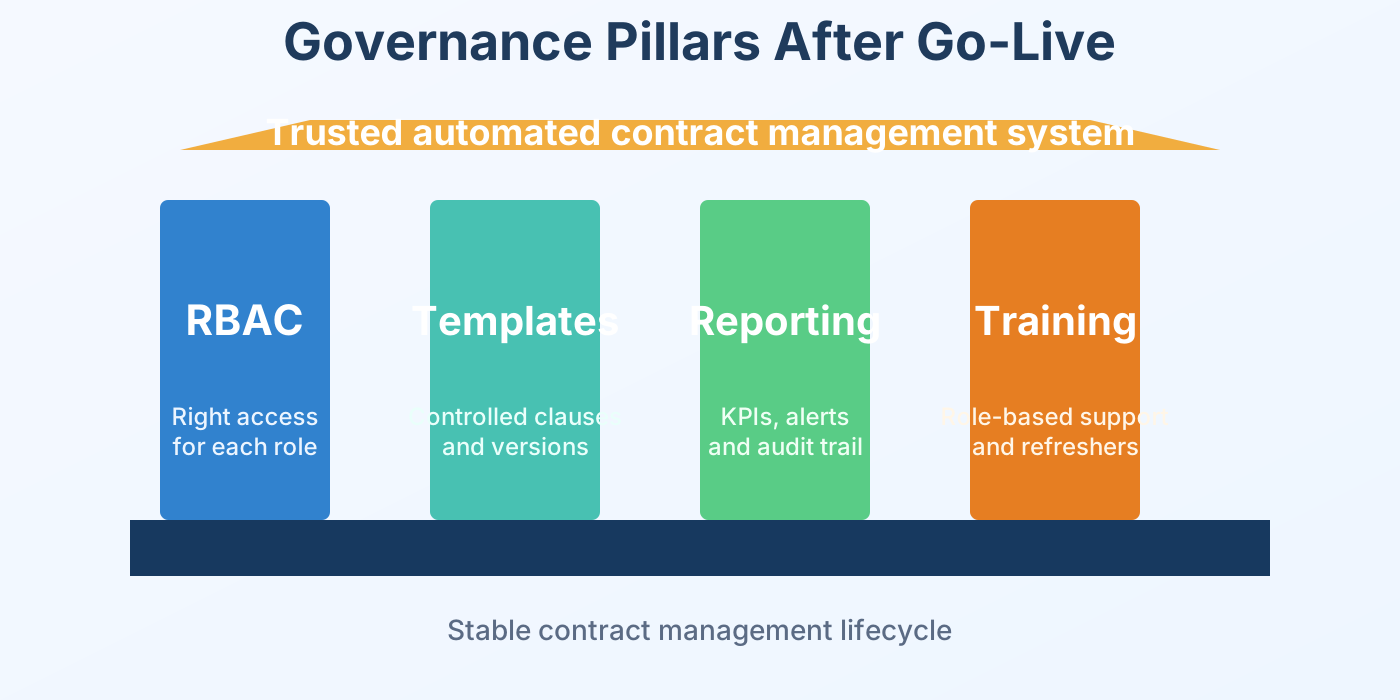
Strong governance keeps the automated contract management system useful, secure, and trusted over time.
What a smooth rollout looks like
A smooth rollout has clear intake, trusted data, visible approvals, and reliable reminders. Users know where to submit requests, reviewers trust the status view, and leaders can see where contracts slow down. That is when the contract lifecycle management system becomes part of normal work instead of a side tool. The best proof is behavioral. People stop asking where a contract is and start asking how to improve the workflow.
Signals that the rollout is working
- Contracts move through the workflow instead of through email threads.
- Dashboards match reality and requestors stop asking for manual status updates.
- Missed approvals decline because reminders and ownership are clear.
- The organization begins improving the process instead of questioning the tool.
Business value for decision makers
For leaders, the value is simple: faster turnaround, fewer manual follow-ups, stronger compliance, and better visibility into risk. That means the contract management software supports business growth instead of creating more admin work. The value grows when the platform supports the full contract management lifecycle from request to renewal. In strong rollouts, better process discipline leads to cleaner decisions across legal, procurement, finance, and operations.
Why CAMARC stands out
CAMARC combines workflow automation, document control, dashboards, lifecycle tracking, and secure collaboration in one place. That matters for organizations comparing contract management systems, contract management tools, contract management software for legal, or software to manage contracts at scale. The strongest choice is usually the product that improves daily work without adding avoidable complexity. CAMARC is positioned to help teams replace fragmented work with a more controlled and measurable contract management process.
Reference: CAMARC resources | CAMARC overview
Frequently asked questions
What is the biggest risk when adopting contract lifecycle management software?
The biggest risk is treating implementation like a file move instead of a process redesign. Most failures come from weak data, low adoption, poor governance, or too much customization.
How long does a CLM rollout usually take?
The timeline depends on contract volume, workflow complexity, integrations, and data quality. A pilot can move quickly, while a broader rollout takes longer because migration, training, and governance need structure.
Should every old contract process be recreated?
No. A new platform is the right moment to remove outdated steps and reduce exceptions. Copying every old habit usually makes the new system harder to manage.
What should teams measure after launch?
Track cycle time, contract volume by stage, incomplete records, off-system approvals, missed deadlines, and adoption by role. Those measures show whether the contract management process is actually improving.
Who should own the platform after go-live?
Most organizations need an executive sponsor, a process owner, a system owner, and departmental champions. Shared ownership keeps the contract lifecycle management platform healthy over time.
Conclusion
Most CLM rollout failures are preventable. Clean your data, align stakeholders, keep the first release simple, and govern the platform after launch. When those foundations are in place, contract lifecycle management solutions create real business value instead of becoming another system users avoid. CAMARC is designed to support that outcome with structure, visibility, workflow control, and stronger lifecycle discipline.
Next steps with CAMARC
- End CTA 1: Request a live demo - See how CAMARC supports request intake, workflow automation, dashboards, approvals, and execution tracking in one contract lifecycle management platform. Request a demo →
- End CTA 2: Review your rollout plan - Compare migration scope, stakeholder readiness, governance, and training against the pitfalls in this guide. Read more CAMARC guides →
- End CTA 3: Explore product fit - Learn how CAMARC supports structured approvals, secure collaboration, and lifecycle visibility from request to renewal. Explore CAMARC →
- End CTA 4: Modernize your contract operations - If you are evaluating enterprise contract lifecycle management software, compare products on adoption, governance, migration support, and day-to-day usability. View the CAMARC CLM page →
Additional rollout infographics
These extra visuals give content teams more graphic elements for the company website version of the blog. They also make it easier for readers to scan the rollout guidance without reading long blocks of text.
Rollout scorecard
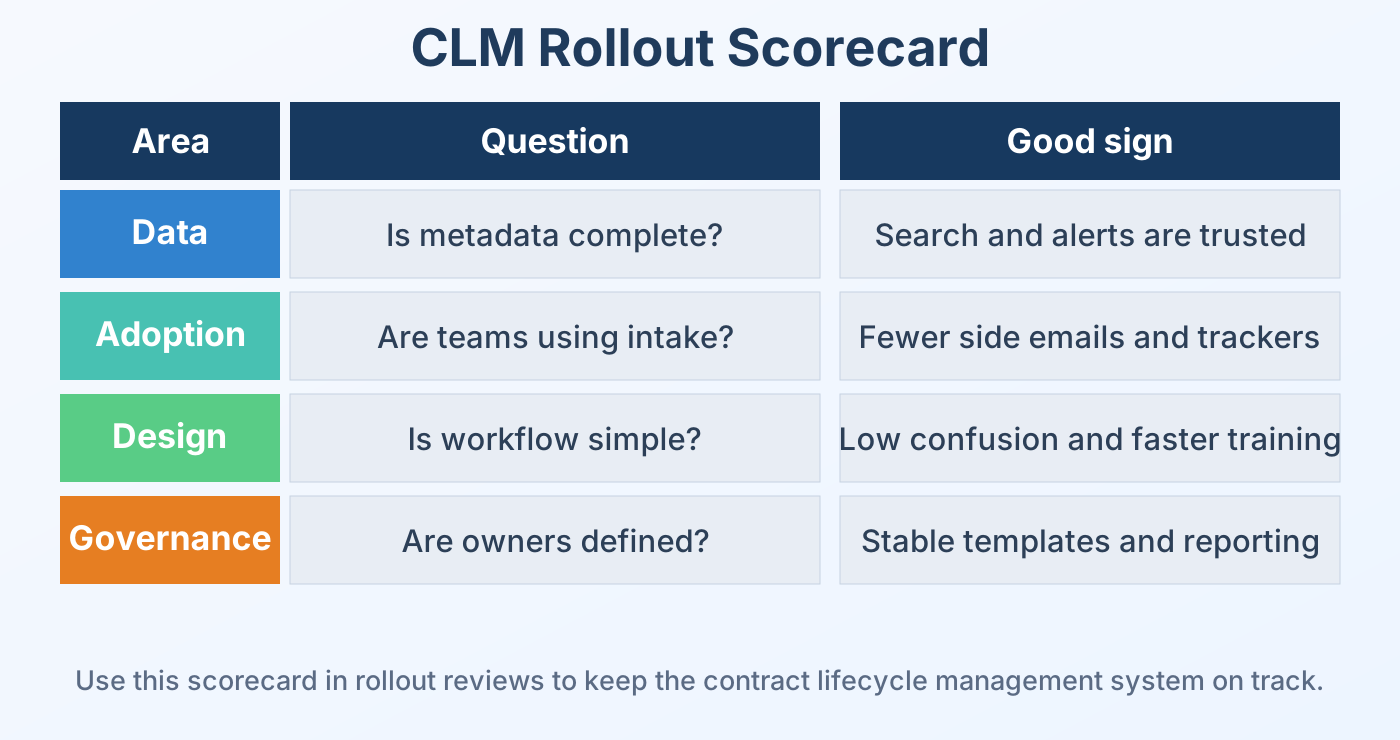
Use this scorecard in weekly rollout reviews to check data quality, adoption, workflow simplicity, and governance readiness.